GDPR support
Follow an erasure request across your connected systems
A person can have a record in your CRM, another in billing and another in support. Samesake maintains the links so your team can find the known records, coordinate erasure and follow what happens next.
One checklist, each source accounted for
Samesake supports your existing GDPR request process. Your systems keep owning their records, and your team carries out deletion in those systems. The registry helps you locate the records and track the results.
Step 1
Find the person’s linked records
Search by name, email, phone or postcode. Check the records linked to the person across your connected sources, and review any uncertain matches before acting.
Step 2
Record the erasure request
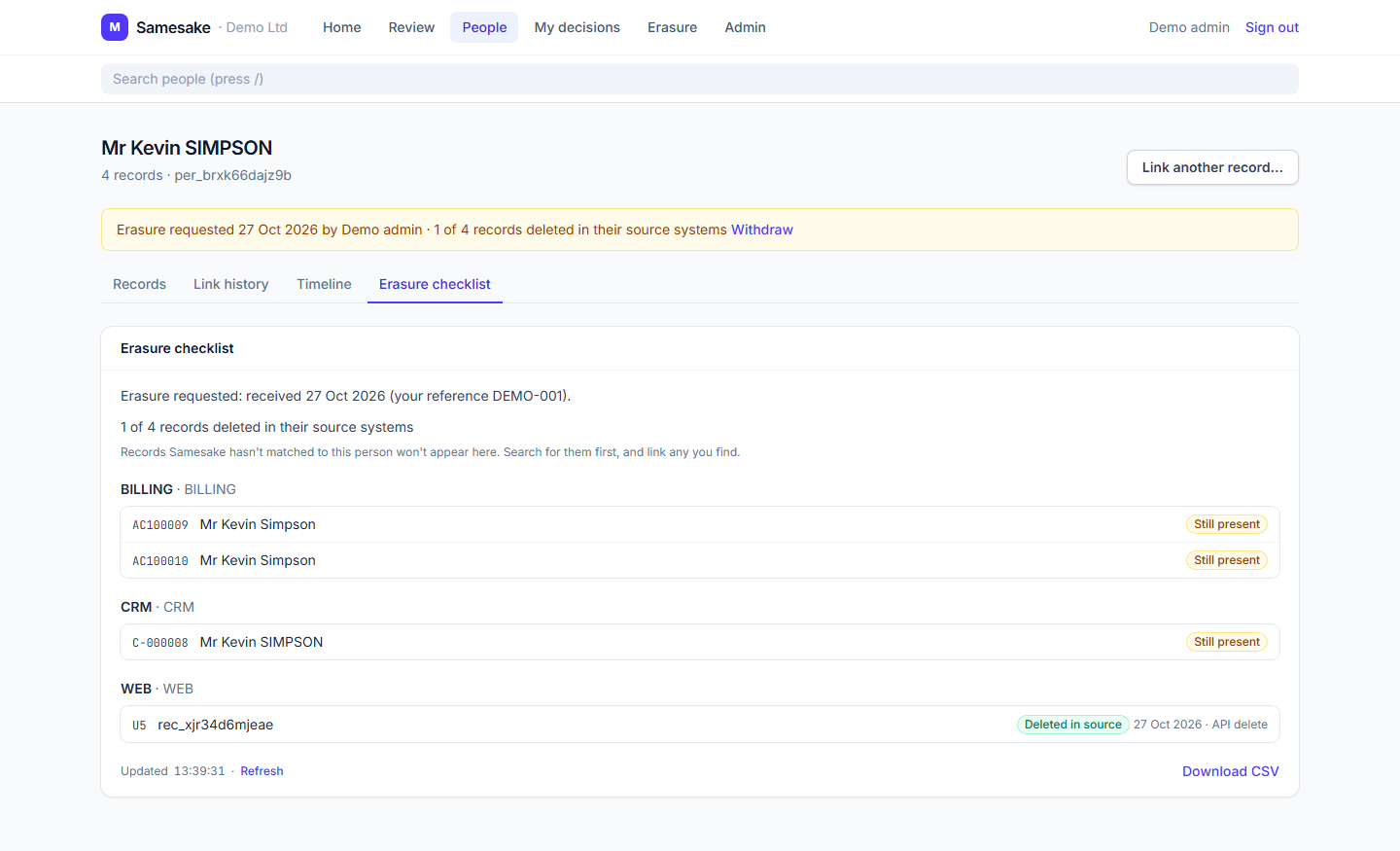
An Admin or Data Protection Officer marks the request. The person’s page gives your team a checklist of their linked records, grouped by source.
Step 3
Delete in the source systems
Your team carries out deletion in each source. Send those deletions to Samesake through the API or a full snapshot; its copy of the record’s matching details is then cleared.
Step 4
Follow progress and keep a record
Check which source records are still present and which have been deleted. Refresh the checklist and download its IDs and statuses to support your own request log.
Step 5
Investigate possible reappearance
If an incoming record matches the retained erasure checks, it is held for investigation. Your authorised team reviews the alert and decides what action is appropriate.
See what is still present
Each source keeps its own record ID. The checklist shows its latest known deletion status, so your team can follow up in the right place. Decisions and erasure actions have an audit history.
A second look when records come back
A restored backup or a later import can bring details back into circulation. For an erasure request, Samesake keeps keyed fingerprints of the known contact details and name with date of birth to check incoming records for a possible return. A matching record is held for your team to investigate.
These checks depend on the details available; they cannot recognise every changed identity. An alert asks your team to assess the record and the request. It does not decide whether that record must be deleted.
Start other privacy tasks with the right records
- Subject access requests: find the person’s linked source records so your team knows where to begin collecting the information.
- Consent and preferences: use the identity map to identify the records an opt-out needs to apply to. Your systems and integrations manage the preference itself.
- Retention reviews: join the identity map to activity data in your own reports to assess the customer across sources.
Explore the privacy use cases or see how the identity map works.
Know what the registry covers
The checklist covers records ingested into Samesake and linked to the person. Search for other possible records and review those links before treating a request as complete. Unconnected systems and records the registry has not matched need your own checks.
Samesake stores the personal details it needs for matching. Its reporting feed carries IDs and statuses, with separate read-only access. Admins and Data Protection Officers manage erasure requests; other members can view the source checklist. Your own request log remains the record of the wider request.
These features support your GDPR work. Your organisation assesses the request, any retention requirements and completion across its systems. Read the data processing agreement for processing and hosting arrangements, or see the access and audit details.
Walk through an erasure case.
Tell us which systems hold your customer records. We’ll show how matching, the source checklist and reappearance checks can fit your existing request process.